
Handling the big data in Salesforce is not a rare issue among companies of all sizes. Bulk data imports are an important aspect of ensuring clean and accurate Salesforce data regardless of whether you are migrating data out of an external system, updating existing data, or consolidating data out of numerous sources.
Nonetheless, bulk imports may be time consuming and subject to errors unless this is effectively done. We will describe the reasons why bulk data loading is critical, the and good practices of how to conduct the bulk importing, and how Smart Lookup Data Loader can help with simplification and automation of this task to become an indispensable tool to every Salesforce administrator and developer.
Why Efficient Data Loading Matters
Importing data is not merely a process of transferring data between locations but having the data within Salesforce be of the integrity, accuracy and usability it warrants. This is the reason why the fast data loading is important:
- Maintaining Data Accuracy: Imports that are poorly implemented may result in wrong, incomplete or duplicated records in your Salesforce instance. This may affect all aspects such as reporting and analytics or even customer relationship and sales operations.
- Saving Time: This may take hours or even days to manually import or use old-fashioned methods particularly when working with large datasets. This time can be significantly cut by an automated data loader.
- Improving Data Quality: Efficient data import tools such as Smart Lookup Data Loader have validation features that your data is up to the requirement of Salesforce before importation commences and that the likelihood of errors is minimal.
- Ensuring Scalability: The more Salesforce instance you have, the greater the amount of data you have. You must have an instrument capable of dealing with large masses of imports without slowness or introducing flaws.
Understanding Bulk Data Imports in Salesforce
Salesforce has a number of ways of conducting bulk data imports making each of them to be applicable in diverse instances. The primary options include:
- Data Import Wizard: An easy, in-built utility of importing custom and standard object data. Smaller and less complex imports.
- Data Loader: More sophisticated macro data importation tool that is used with complex data. Data Loader can be used to manage the bulk imports, updates, upserts, and deletions.
- Third-Party Tools: Specialized bulk importing tools, such as Smart Lookup Data Loader, provide better bulk importing with such options as automatic field mapping, duplicate prevention and faster data validation.
Although the native tools at Salesforce work, they are slow-paced and need to be manually adjusted. Here is where Smart Lookup Data Loader will fit in - bulk importing is automated and optimized.
Best Practices for Bulk Data Imports
The following are some of the best practices that should be considered in order to extract maximum out of your bulk data imports and reduce the chances of error:
1. Plan Your Data Import Strategy
Before jumping into the import process, plan ahead:
- Identify Your Data: Determine which objects and records you need to import, update, or delete. Is it customer data, contact information, or sales records?
- Understand Relationships: Pay close attention to lookup and master-detail relationships (e.g., Contacts to Accounts). Incorrect relationship mapping can result in orphaned or incorrectly linked records.
- Clean Your Data: Ensure that your data is free of duplicates, incomplete records, and incorrect data types. Use tools like Excel or third-party data-cleaning software to prepare your data before import.
2. Test with a Small Sample First
Before conducting a full-scale import, always start by testing with a small sample (5–10 records). This will help identify potential issues with field mappings, data consistency, or Salesforce record types before you import thousands of records.
3. Use Field Mapping and Upsert Functionality
Manually matching fields in a CSV file to Salesforce fields is tedious and prone to error. Smart Lookup Data Loader automates this process:
- Auto-Mapping: The tool automatically matches CSV columns to Salesforce fields, ensuring accuracy and saving time.
- Upsert Functionality: Smart Lookup Data Loader uses upsert logic to update existing records or insert new ones, preventing duplicate entries and ensuring data integrity.
4. Monitor the Import Process
Keep track of your data imports in real time. Smart Lookup Data Loader provides progress bars, status updates, and detailed error logs to monitor the status of your import and identify any issues as they occur.
5. Handle Errors Efficiently
Even with the best tools, errors can still occur. Smart Lookup Data Loader gives you the ability to:
- Review Detailed Logs: After an import, review the error logs to understand what went wrong. Errors might include missing data, invalid field values, or issues with relationships.
- Fix and Re-import: Once you identify the errors, simply fix the issues in your CSV file and re-import the corrected data.
How Smart Lookup Data Loader Makes Bulk Imports Easy
Smart Lookup Data Loader is designed to simplify and optimize the process of bulk data imports. Here’s how it stands out:
1. Auto-Field Mapping
Mapping fields manually in a large dataset can be time-consuming and prone to mistakes. Smart Lookup Data Loader automatically matches your CSV columns to Salesforce fields, streamlining the process.
- Smart Mapping: The tool automatically detects CSV column headers and matches them to Salesforce field names.
- Manual Adjustments: You can easily fine-tune any automatic mappings with a simple drag-and-drop interface.
2. Data Validation Before Import
Smart Lookup Data Loader checks for missing required fields, incorrect data types, and formatting errors before the import begins. This prevents import errors and ensures that the data being loaded into Salesforce is clean and consistent.
3. Upsert and Duplicate Prevention
When importing large datasets, it's common to accidentally create duplicate records. With Smart Lookup Data Loader, duplicates are automatically prevented using upsert logic. It updates existing records where needed and adds new records only when they don't already exist in Salesforce.
- Automatic Duplicate Prevention: The tool automatically checks for duplicates based on unique identifiers and updates records accordingly.
4. Fast Import Process
Smart Lookup Data Loader is optimized for speed. Unlike Salesforce’s native tools, which can slow down with large datasets, Smart Lookup Data Loader processes your bulk data imports in minutes, saving valuable time.
5. Robust Error Handling
If an error occurs during the import process, Smart Lookup Data Loader provides a clear error log with detailed information about what went wrong. Whether it's a formatting issue or a data mismatch, the error logs make it easy to pinpoint the problem and resolve it quickly.
6. Import History Tracking
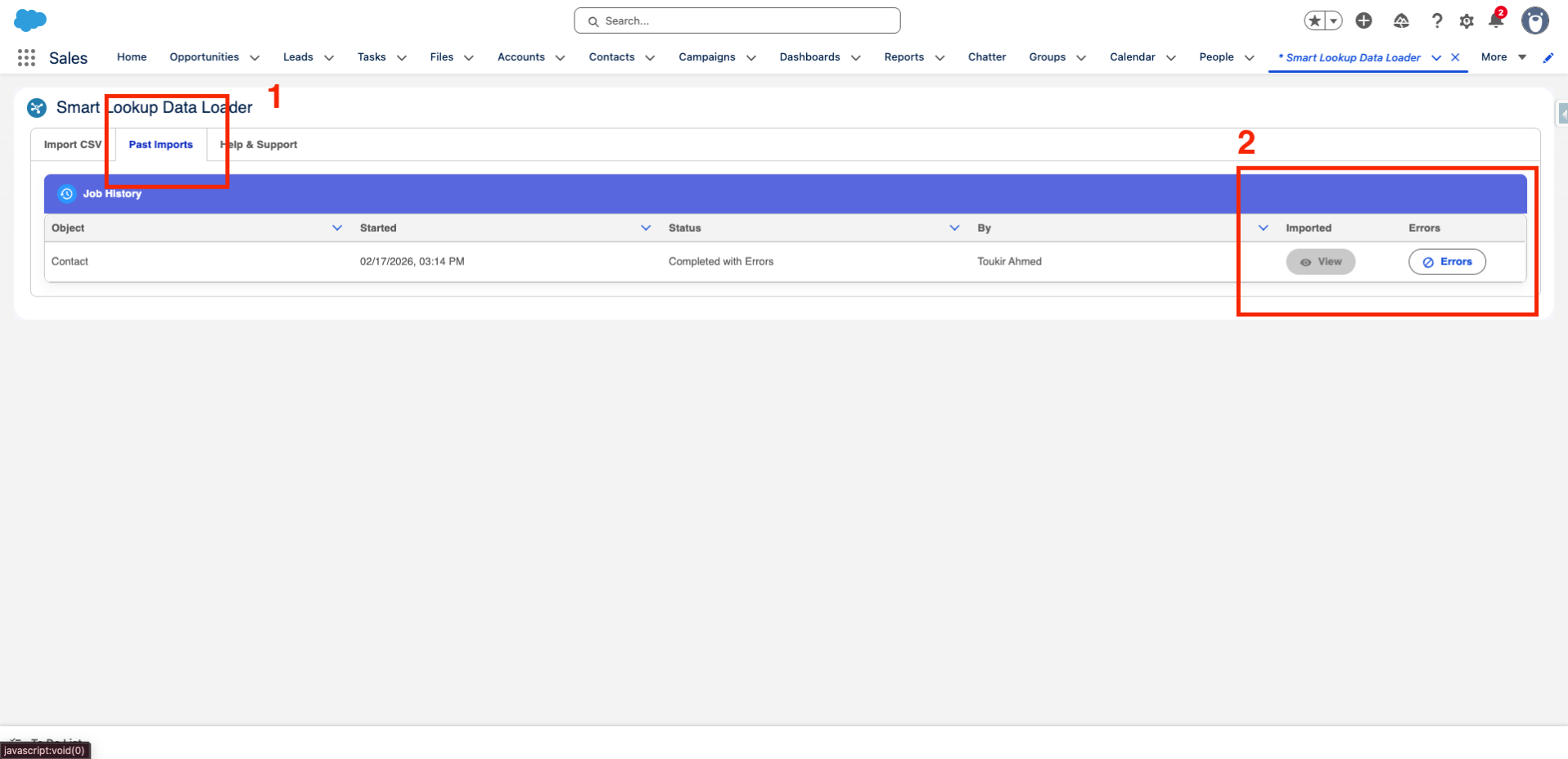
Once an import is complete, Smart Lookup Data Loader keeps a record of all imports in the Import History tab. This allows you to review previous imports, check their status, and track the success of past data loading operations.
Conclusion
Bulk data imports are an inevitable part of working with Salesforce, but they don’t have to be a painful and error-prone task. By following best practices and using tools like Smart Lookup Data Loader, you can streamline the process, ensure data accuracy, and save valuable time.
With its auto-mapping, upsert functionality, data validation, and real-time error tracking, Smart Lookup Data Loader is the go-to tool for efficient bulk data imports. No matter the size of your dataset, Smart Lookup Data Loader will make your Salesforce data management faster, easier, and more reliable.
Ready to simplify your bulk data imports?
Try Smart Lookup Data Loader today and experience the future of efficient data loading in Salesforce!
Get it on AppExchange