
Data integration is a critical component for any business using Salesforce. Whether you're importing customer data, syncing with third-party applications, or consolidating information from various sources, seamless data integration ensures that your Salesforce records are up-to-date, accurate, and easily accessible.
However, the process of managing and importing large datasets can often be complex and time-consuming. This is where Smart Lookup Data Loader comes in. By integrating smoothly with Salesforce, Smart Lookup Data Loader simplifies data imports, syncs external data, and enhances the overall data integration process.
The Importance of Data Integration in Salesforce
Effective data integration in Salesforce is essential for several reasons:
- Data Consistency: Ensures that your data is consistent across all systems and Salesforce objects. Integration helps avoid discrepancies between different data sources, leading to more accurate reporting and decision-making.
- Efficient Operations: Automates the flow of data between different systems, reducing the need for manual data entry and the risk of human error.
- Real-Time Data Access: Real-time integration allows your team to access the most up-to-date data in Salesforce, enabling them to respond to customer needs and sales opportunities more quickly.
- Improved Customer Experience: With integrated data, you have a 360-degree view of your customers, which helps in providing personalized services and improving overall customer satisfaction.
How Smart Lookup Data Loader Enhances Data Integration
Smart Lookup Data Loader acts as a bridge between your external data sources and Salesforce, making it easy to bring in bulk data without the usual manual overhead. Here’s how it streamlines integration:
1. Automated Field Mapping
Integration often involves mapping data from different systems with varying field names. Smart Lookup Data Loader’s auto-field mapping feature automatically matches column headers from your CSV file to the appropriate Salesforce fields, significantly reducing the time spent on manual mapping.
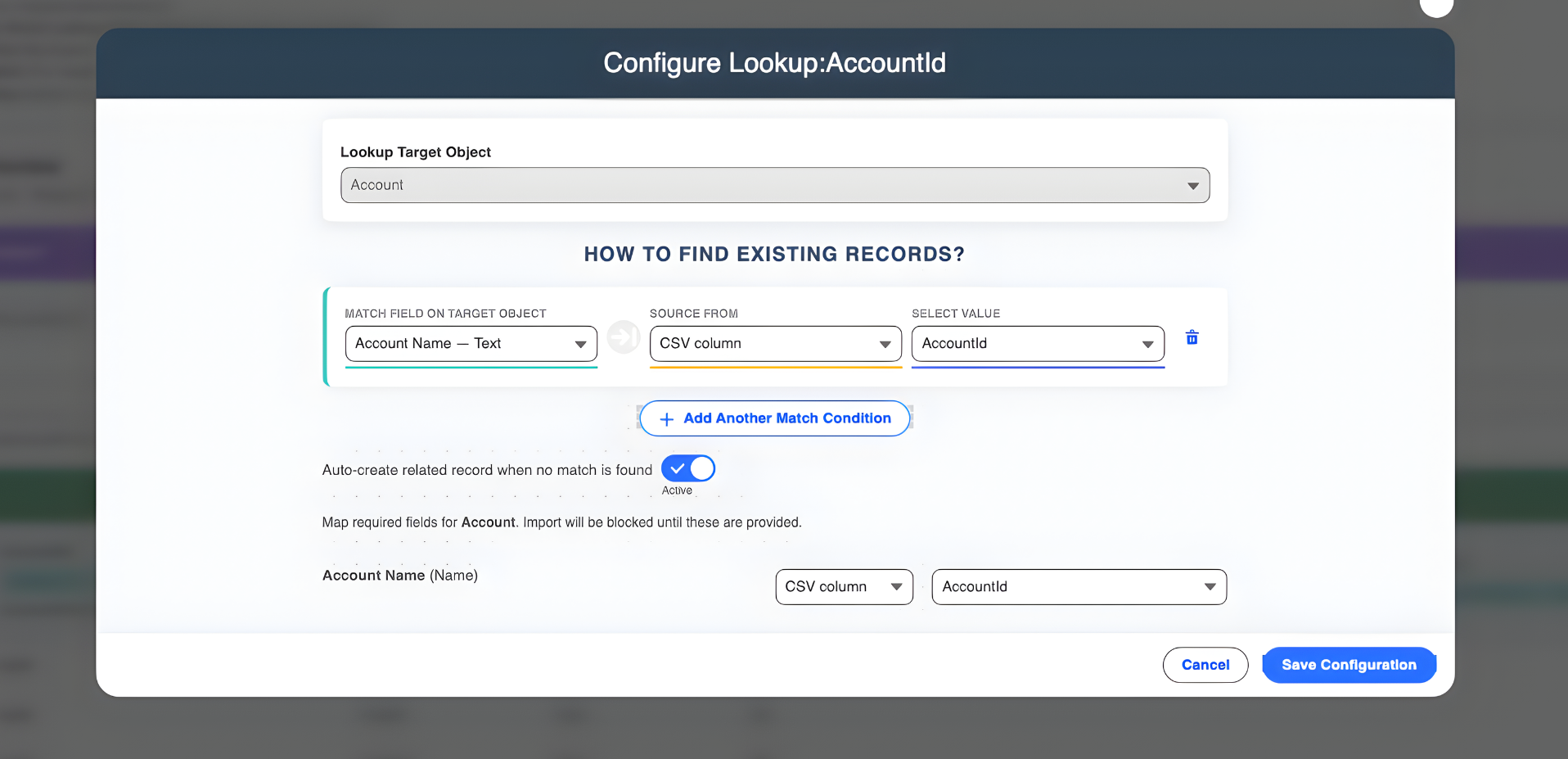
2. Seamless Bulk Data Imports
When integrating large amounts of data, speed is key. Smart Lookup Data Loader is built for high-performance bulk imports, allowing you to load thousands of records in minutes. This ensures that your integration tasks are completed quickly, without slowing down your Salesforce instance.
3. Upsert and Duplicate Management
Data integration can often result in duplicate records if not handled correctly. Smart Lookup Data Loader uses upsert functionality to either update existing records or insert new ones, based on unique identifiers. This ensures that your Salesforce data stays clean and free of duplicates during the integration process.
4. Data Validation and Error Handling
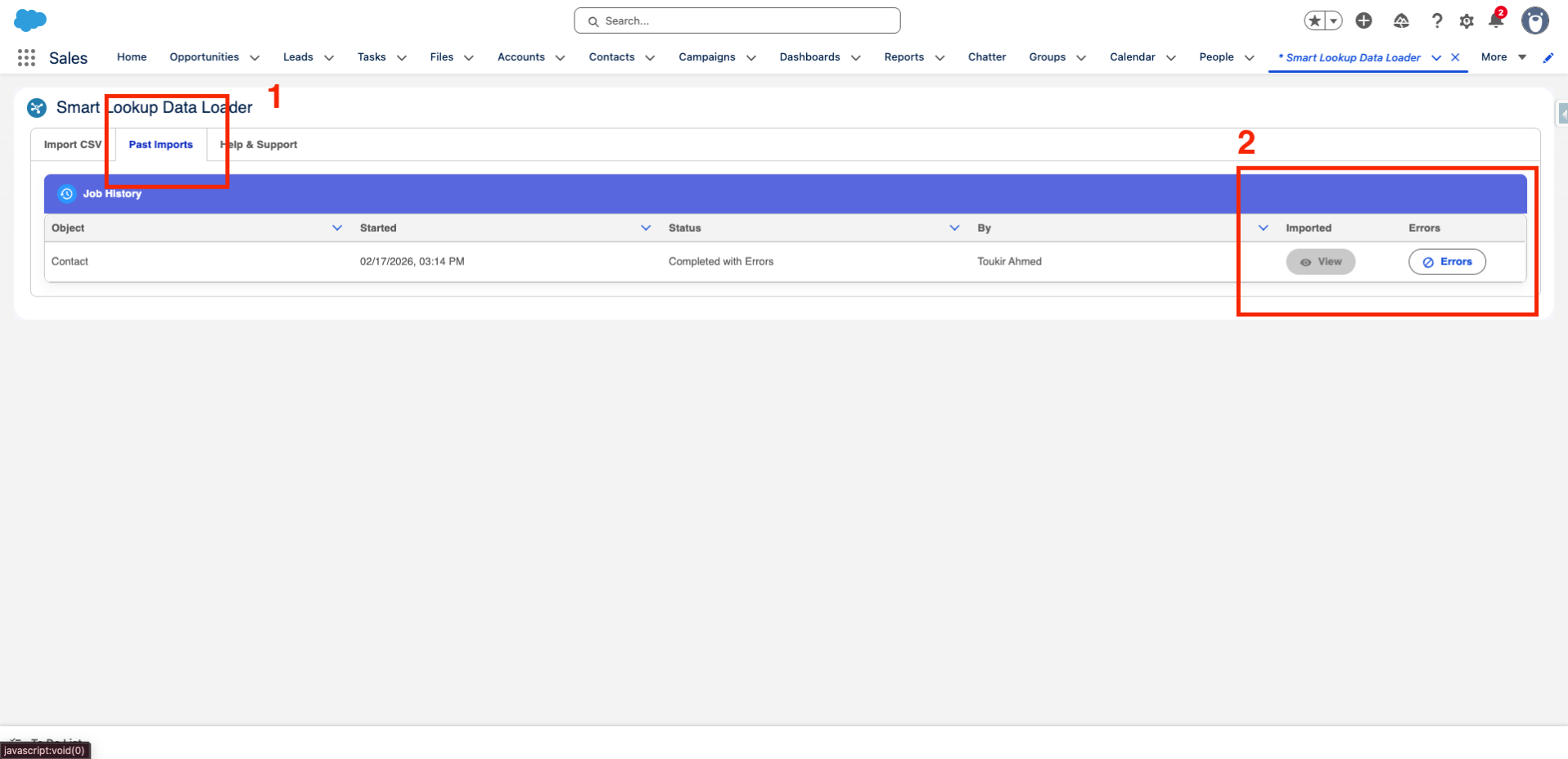
To ensure that only high-quality data enters Salesforce, Smart Lookup Data Loader performs real-time data validation. It checks for missing required fields, incorrect data formats, and other errors before the data is imported. If any errors occur, the tool provides detailed logs to help you quickly identify and fix the issues.
5. Import History and Tracking
For better oversight of your integration tasks, Smart Lookup Data Loader provides an Import History tab. This feature gives you a centralized place to review all import attempts and their status (success, failure, etc.).
Why Smart Lookup Data Loader is Essential for Data Integration
- Automates Field Mapping: Saves time and reduces errors by automatically mapping CSV columns to Salesforce fields.
- Handles Large Data Sets Efficiently: Imports bulk data quickly and accurately, reducing the time spent on manual imports.
- Upsert and Duplicate Prevention: Ensures that existing Salesforce records are updated without creating duplicates.
- Syncs External Data Seamlessly: Brings in data from external systems, ensuring that your Salesforce instance is always up-to-date.
- Robust Error Handling: Offers detailed error logs and tracking, ensuring that all imports are clean and error-free.
Conclusion
Integrating and importing data into Salesforce doesn’t have to be a difficult, error-prone task. Smart Lookup Data Loader makes the process fast, easy, and efficient, ensuring that your Salesforce instance is always populated with accurate, up-to-date data. By automating field mapping, preventing duplicates, and syncing external data, Smart Lookup Data Loader plays a critical role in streamlining your data integration efforts.
Ready to make your data imports easier?
Try Smart Lookup Data Loader today and experience seamless data integration in Salesforce!
Get it on AppExchange