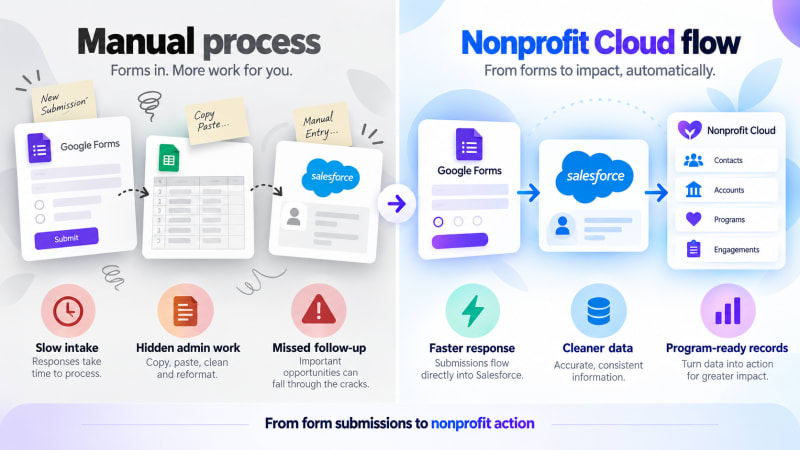
Almost every nonprofit we work with runs on the same two tools and the same gap between them.
Salesforce holds the constituent record: the donor, the volunteer, the programme participant, the case. Google Forms holds everything that arrives from the outside world: volunteer signups, programme applications, intake questionnaires, event RSVPs, feedback surveys, incident reports from the field.
Between them sits a person. Usually a programme coordinator, sometimes a volunteer, occasionally the executive director at eleven at night, copying rows from a spreadsheet into NPSP.
Why do nonprofits end up copying form data by hand?
It is not a technology failure. It is a rational sequence of decisions.
Google Forms is free and takes four minutes. When a programme manager needs a signup form for Saturday's cleanup, they are not going to file a ticket with the Salesforce admin, who is one person covering fundraising, programmes and IT, and who has a queue. They are going to build a form.
So the forms multiply. A typical mid-size nonprofit has somewhere between five and thirty active Google Forms that nobody has inventoried. Each one is producing data that belongs in Salesforce and is not getting there.
The usual fixes do not fit well either:
| Usual fix | Why it does not fit a nonprofit |
|---|---|
| Paid middleware | A recurring subscription, and every recurring subscription in a nonprofit budget has to justify itself against programme spend. "Software to move data between two other pieces of software" is a hard sell to a board. |
| Custom development | Requires a budget line and, worse, ongoing maintenance from a sector with high staff turnover. |
| The Nonprofit Success Pack | Covers a lot, but it does not include form capture. |
What does a free native option change for nonprofits?
Google Form Auto Sync is a free managed package on the AppExchange. It captures every Google Form submission as a Salesforce record the moment it arrives, with no third-party service in between.
Three things about it matter specifically in a nonprofit context.
It is free with no cap. Not a discounted nonprofit rate, not ten free power-ups. There is no meter in the architecture, because the form posts directly to your org. A signup form that gets four hundred responses during a campaign costs the same as one that gets four. We put no limits on the number of forms or responses. Google's standard Apps Script quotas still apply.
No middleware vendor sees the data. This matters more in this sector than almost any other. If your forms collect information about beneficiaries, clients, minors, or anyone in a vulnerable situation, adding a commercial automation vendor to the data path is a real governance question, and one your board or your funder may ask about. Responses travel between two parties only: Google, where the form lives, and your Salesforce org. No TwinStack servers or other middleware sit in between.
It survives staff turnover. The connection is a managed package plus a script, not tribal knowledge. The dashboard shows every connected form and its last sync time, so the next coordinator can see what exists without archaeology.
Does it work with NPSP and Nonprofit Cloud?
The app captures submissions onto a dedicated Form_Response__c object rather than writing directly into Contact, Lead, or any NPSP or NPC object.
For nonprofits, this is the right design rather than a limitation. Nonprofit data models are opinionated. NPSP has household accounts and affiliations; Nonprofit Cloud has Program Enrollments, Cases, and Party Relationships. An integration that guessed where to write would guess wrong.
Instead, the raw submission is captured intact and you route it with a record-triggered Flow.
Where you route a response depends on which nonprofit product your org uses. In Nonprofit Cloud, programme sign-ups usually become Program Enrollment records. In NPSP with the Program Management Module (PMM), the equivalent is a Program Engagement. Volunteer sign-ups can create Contacts and, if you use a volunteer management tool, its shift or job records. Event registrations work well as Campaign Members, and intake forms as Cases. Every raw submission is kept as a Form Response record, so you can always check what was originally submitted.
Because the original submission is never discarded, you keep an auditable record of exactly what the person entered, which is often a requirement for grant reporting and programme evaluation.
What are the most common nonprofit use cases?
Volunteer management. The recurring pain: a signup form fills up, and somebody has to reconcile it against existing volunteer records before Saturday. With capture automated, the reconciliation Flow runs on submission and the coordinator sees a clean list.
Program intake. Applications arrive continuously, and the wait between "person applies" and "person appears in Salesforce" is often the longest part of the intake process. Closing it to seconds is a service-delivery improvement, not just an admin one.
Grant and outcome reporting. Surveys tied back to programme records mean your outcome data is in the same system as your delivery data, which is the whole reason to have a CRM.
Field data collection. Staff and volunteers in the field can submit reports from a phone through a Google Form and have them land in Salesforce immediately, without needing Salesforce licences or app access.
How do you set it up?
The realistic version, for an under-resourced admin:
- Inventory your forms first. Before installing anything, list every active Google Form in the organisation and who owns it. This is usually the most valuable hour of the project regardless of what you do next.
- Install in a sandbox. The package installs in a few clicks and creates its object, permission sets and setup tab.
- Connect your highest-volume form first. The setup wizard generates the script and credentials; you paste the script into that form's Apps Script editor.
- Build the routing Flow for that one form. Get one right before doing five.
- Then roll out. Each additional form takes about 5 minutes to connect, plus time to build whatever routing it needs.
About 15 minutes for your first form and about 5 minutes for each one after that. If you route responses with a Flow, allow extra time to build it.
If Salesforce is unavailable when someone submits, the response is still saved in Google Forms, but it isn't sent again automatically. Check the dashboard's last-sync time to spot any gaps.
Who built this?
TwinStack Solutions works almost exclusively in the nonprofit Salesforce space: Nonprofit Cloud implementations, NPSP-to-NPC migrations, and tooling built around the problems those projects surface. Google Form Auto Sync came directly out of client work, because the same gap showed up in project after project.
We keep it free because the nonprofits who need it most are the ones least able to add another subscription.
Capture every submission, free.
Google Form Auto Sync posts each Google Form response straight into your own Salesforce org. No middleware, no task counter, no tiers.
Get It Now, FreeWant the full picture first? See the Google Form Auto Sync product page.
Planning an NPSP-to-NPC migration or a Nonprofit Cloud implementation? That is our day job. Get in touch.