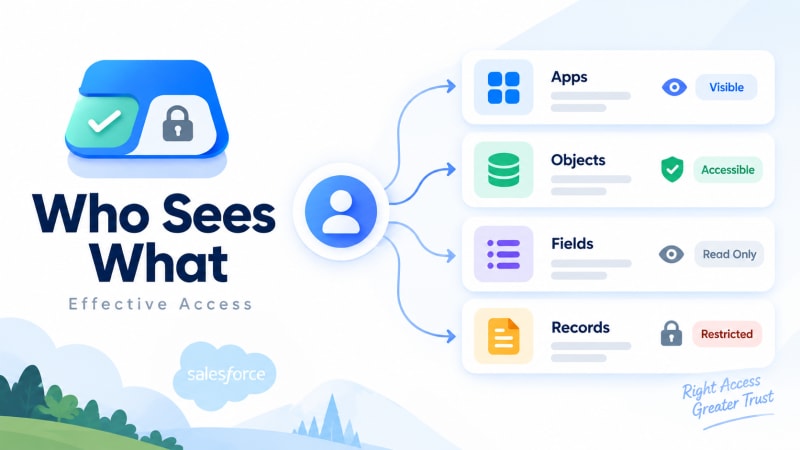
A free, native, read-only Salesforce app that answers the access question in the direction it is actually asked.
Short answer: Who Sees What is a free, 100% native, read-only Salesforce managed package. Pick any user, and it shows every app, object, field and record they can access, plus the exact profile, permission set or sharing rule responsible for each grant. It cannot change anything, which is what makes it safe to install in production.
What is it?
It is a permission inspector that starts from the person, not the configuration.
Standard Salesforce Setup is organised around profiles, permission sets, permission set groups, role hierarchy, sharing rules and manual shares. Each of those screens tells you what a rule does. None of them tell you what a person can actually do, because access is the sum of all six, evaluated together. The three layers these six sources feed into are worth understanding separately.
Who Sees What inverts the direction. You pick a user. It resolves everything that applies to them, across every layer, into one screen.
Why does it exist?
Because the most common access question in Salesforce administration is asked backwards from how the platform is built.
Someone asks "why can this user see that record?" Setup makes you answer it by opening the user's profile, then their permission sets, then their permission set groups, then the role hierarchy, then sharing rules, then manual shares, checking each one for a relevant grant. Object access, field-level security and record visibility live on different screens entirely.
That reconstruction takes real time. Admins report it commonly taking thirty minutes or more for a single user on a single object, and that is when you already suspect where the access came from. When you don't, it takes longer.
Who Sees What exists to collapse that reconstruction into a lookup. There is a longer account of why that reconstruction eats an afternoon.
How does it work?
- Pick any user in your org. No configuration, no setup screen to define first.
- Optionally narrow to a specific app, or look at everything.
- See every object, field and record they can reach, with the exact profile, permission set or sharing rule that granted each one.
Because it only reads permission metadata and does not touch the Salesforce data model itself, there is nothing to configure before the first result. Install it, pick a name, read the answer.
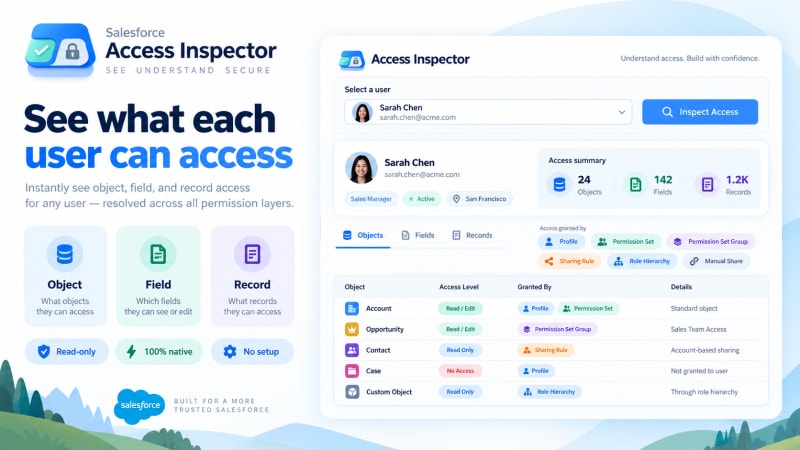
Every access is shown next to the rule that granted it, so the answer and its cause arrive together.
Where does the access data come from?
Entirely from your own org. Who Sees What queries Salesforce's own permission and sharing metadata: profiles, permission sets, permission set groups, role hierarchy, sharing rules and manual shares. Nothing is transmitted anywhere else, and there is no external service in the picture at all.
That is also why it can be read-only with no loss of function. Every answer it gives is a resolution of rules that already exist in your org; it never needs to write anything to produce that answer.
Who is it for?
Anyone who has to answer "what can this person do" and currently has to prove it by hand: admins troubleshooting a specific complaint, security and compliance reviewers running an access review, IT and people ops confirming onboarding and offboarding, consultants documenting an org during a handover, and anyone cleaning up permission set sprawl.
Which Salesforce products does it work with?
Sales Cloud, Service Cloud, Data Cloud and Nonprofit Cloud, on nearly every edition, including orgs that use Person Accounts. Because it reads permission metadata rather than depending on a particular object model, it does not care which cloud your org runs.
What does it cost?
Nothing. Free, with no user cap, no usage tier, and no feature held back for a paid version. There is one version of the app. The same is true of Google Form Auto Sync, our other free app on the AppExchange.
Is it secure?
This is the question worth spending the most time on, because it is unusual for a tool in this category to be genuinely unable to cause harm.
No write operations, anywhere. Nothing about a profile, permission set, role or sharing rule can be modified from inside the app. It cannot grant access, revoke access, or touch a permission.
Nothing leaves the org. It runs entirely inside Salesforce. Your permission model is never sent to an external service for analysis.
Because it cannot change anything, it can be shared more widely than Setup access. A security reviewer, an auditor, or a new admin can be given access to Who Sees What without being given access to modify permissions.
That last point matters more than it first appears. Most permission-inspection needs get solved today by temporarily granting someone Setup access so they can look around, which is itself a permission risk. A read-only tool removes that trade-off entirely.
When should you not use it?
You need to change access, not just see it. Who Sees What tells you what is granting an access and where to go fix it. It does not fix it for you.
You need a scheduled, automated compliance report emailed to someone weekly. Who Sees What is an interactive lookup tool, not a reporting or alerting platform.
How long does it take to get an answer?
Once installed, seconds per user. There is no setup phase, no configuration screen, and no data to import. You install the package, open the app, and search for a name.
Where do I get it?
On the Salesforce AppExchange, free.
Who built it?
TwinStack Solutions, a Salesforce partner working primarily in the nonprofit Salesforce ecosystem. Who Sees What, like our other AppExchange apps, came directly out of a recurring problem on client implementations: access questions that took an afternoon to answer properly, on projects where an afternoon was not available.
Who Sees What is built and maintained by TwinStack Solutions, a Salesforce partner. Questions about setup: [email protected]
Read-only, so it installs in production without a change window.
Pick a user, see everything they can reach, and see the rule that granted it. Free, with no user cap and no paid tier above it.
Get It Now, Free