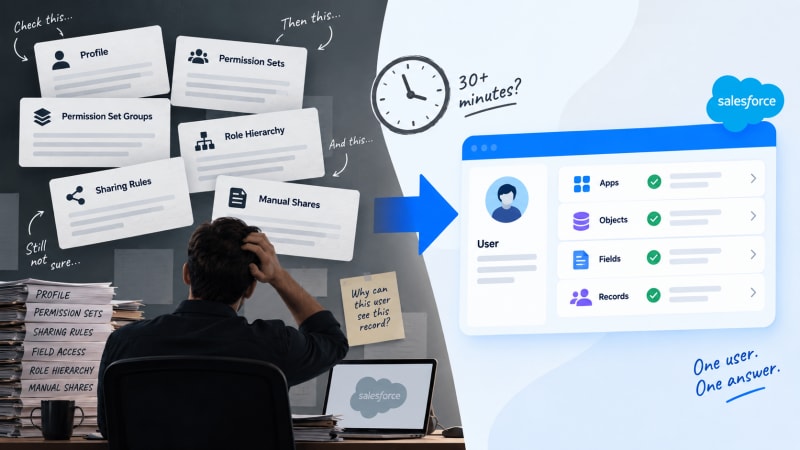
Access lives across six systems that never talk to each other. Here is why, and what changes when they do.
Short answer: Salesforce access is the intersection of six independent systems, profile, permission sets, permission set groups, role hierarchy, sharing rules and manual shares, and no single screen in Setup shows all six for one person at once. Answering "why can this user see that" means opening each one separately and reconstructing the answer in your head. A tool that starts from the user rather than from the rule collapses this to a lookup.
The question that starts every investigation
It usually arrives the same way. A message, a screenshot, a ticket. Someone can see a record, or a field, or an app tab, that they should not be able to see. Or the reverse: someone who should have access does not.
The question sounds simple: why can this user see that?
The honest answer requires reconstructing every rule that touches that user, on that object, for that record, and figuring out which one is responsible. That reconstruction is where the afternoon goes.
Why the reconstruction takes so long
Salesforce access is evaluated across three layers, and each layer draws on more than one source.
Object-level access comes from the user's profile and any permission sets or permission set groups assigned to them. To check it fully, you open the profile, note what it grants, then open every assigned permission set individually, because a permission set can grant access the profile does not, and a profile can grant access a permission set does not restrict.
Field-level security is a separate setting from object access entirely. A user can have full object access and still not see a specific field. Salesforce's own Field Accessibility screen shows this per field, per profile, which means checking multiple fields means multiple screens.
Record-level access is the layer most people get wrong first. It depends on organisation-wide defaults, role hierarchy, sharing rules, and manual shares, none of which are visible from the profile or permission set screens at all. A user can have full object and field access and still not see a particular record because of where they sit in the role hierarchy relative to the record owner.
None of these three layers is visible from any of the others. To answer one access question fully, you check all three, and within each layer you may be checking several individual grants. The three layers are explained in detail here.
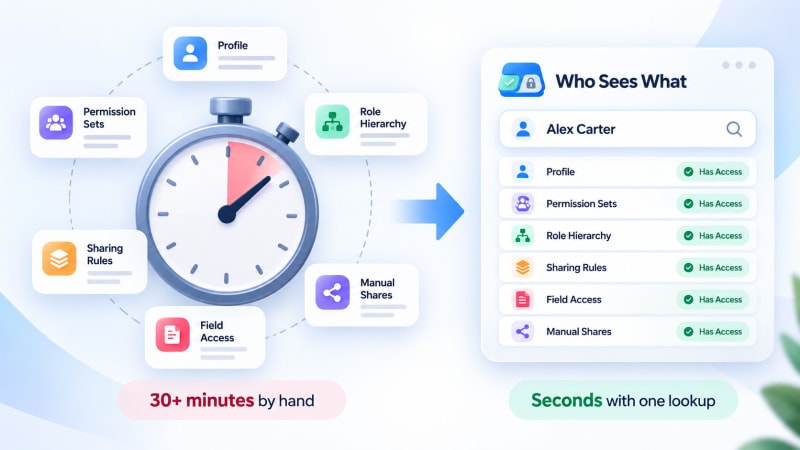
The same reconstruction, resolved from the user rather than from the rule.
The direction problem
There is a second reason this takes so long, and it is more fundamental than the number of screens.
Setup is built to answer "who does this permission set affect." You open a permission set and see a list of assigned users. That is the natural query the interface supports.
The question you actually get asked runs the other way: "what can this person do." There is no screen that starts there. To answer a person-first question using rule-first screens, you have to enumerate every rule that could possibly apply to that person, then check each one, because nothing tells you in advance which rules are relevant to them specifically.
This is the structural reason the investigation takes thirty minutes even for an admin who knows exactly where to look. The interface was not built to answer the question in the direction it gets asked.
What this costs beyond the thirty minutes
The direct time cost is the visible one. Three second-order costs matter more.
Security reviews get sampled instead of completed. A proper access review means confirming effective access for every user who should have it and nobody who shouldn't. At thirty-plus minutes per user, reviewing an org of any real size by hand is not realistic, so reviews sample a subset and hope the sample is representative.
Onboarding and offboarding checks happen on trust rather than verification. Someone assigns the standard permission sets for a new hire and assumes it worked. Someone removes access for a departing employee and assumes it is fully gone. Confirming either one properly means the same thirty-minute reconstruction, so most organisations skip the confirmation step entirely.
Over-permissioned users survive undetected. A permission granted for a one-time project and never revoked, a permission set assigned to cover an edge case that then applies broadly, an inherited role grant nobody remembers configuring. These accumulate quietly because finding them requires the same investigation that finding any single access issue requires, and nobody runs that investigation without a specific trigger. There is a practical review process for catching that drift.
What changes when the direction is inverted
The fix is not more thorough documentation of the six systems. It is starting the query from the person instead of the rule.
Pick a user. Resolve every profile, permission set, permission set group, role hierarchy position, sharing rule and manual share that applies to them, at once, across object, field and record level. Show the result as one answer instead of six partial ones. And name the specific rule responsible for each grant, so the fix is obvious rather than requiring a second investigation.
That is the entire mechanism behind Who Sees What, a free native Salesforce app we built after running into this exact thirty-minute reconstruction often enough that it stopped making sense to keep doing it by hand.
What a person-first lookup actually shows
For any user you select:
- Every object they can create, read, edit or delete
- Every field on those objects they can see or edit, distinct from object access
- Which records they can reach, accounting for role hierarchy, sharing rules and manual shares
- The exact profile, permission set or sharing rule responsible for each of the above
Because it only reads existing permission metadata, there is nothing to configure first. Install it, search for a name, read the answer.
Where this matters most
Troubleshooting. A specific complaint resolved in the time it takes to look someone up, rather than scheduled for whenever thirty free minutes appear.
Security and access reviews. A review that actually covers everyone who should be checked, rather than a sample, because checking one more user costs nothing extra.
Onboarding and offboarding. Confirming a new joiner's access matches what was intended, and confirming a leaver's access is actually gone everywhere it was granted, both in the time it takes to search a name.
Permission set cleanup. Before deleting a permission set that looks redundant, seeing exactly which access it is currently granting to which users, so cleanup does not become the next incident.
Try it against a user you already have a question about
If there is an access question sitting in your inbox right now, that is the fastest way to see the difference. Look the person up and compare the time to what the manual reconstruction would have taken.
Who Sees What is built and maintained by TwinStack Solutions, a Salesforce partner. Questions about setup: [email protected]
Answer the question sitting in your inbox right now.
Free, read-only and native. Install it, search for a name, and compare the time to the manual reconstruction.
Get It Now, Free