Short answer: clean donor data before you migrate, not during. Start by giving every record a stable ID, then remove duplicates using more than one field, rebuild household groupings, standardise addresses and contact preferences, check that gift totals and fund allocations add up, and archive what you no longer need. Keep clean-up and migration as separate projects. When a record fails during migration, you want to know it failed because of the move, not because of a clean-up change made the same week.
Why clean-up decides how a migration goes
A migration copies whatever you give it. Duplicates become duplicates in the new system, broken households become broken households, and gift totals that never reconciled still do not reconcile. Worse, Salesforce's data model is relational, so one bad donor record can break the gifts, soft credits and relationships that point to it. Cleaning first is cheaper than cleaning after, and much cheaper than cleaning during.
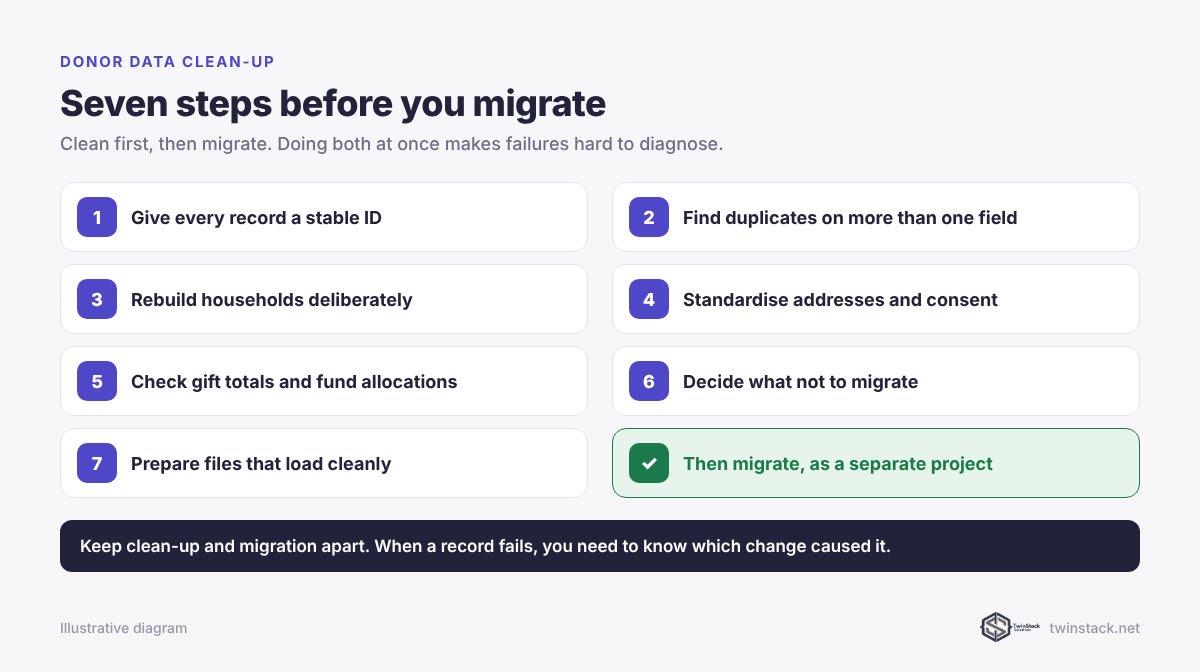
Step 1: give every record a stable ID
Before changing anything, make sure every donor, household and gift in your current system has a unique ID that will not change, and export it. This ID becomes your match key during migration and your audit trail afterwards. If your old system has no reliable ID, create one now.
Step 2: find duplicates using more than one field
Matching on name alone merges different people and misses the same person spelled two ways. Use combinations:
- name plus postcode
- name plus email
- email alone, where emails are reliable
- phone number, normalised to one format
Review probable duplicates with staff who know the donors before merging. Two records with the same name and address may be a parent and child. Our post on why single-field matching creates duplicates explains how to pick match keys that hold up.
Step 3: rebuild households deliberately
Households drive greetings, acknowledgement letters and household giving totals, so they are worth getting right.
- Confirm who lives together now, not ten years ago.
- Decide which member is primary for each household.
- Separate people who have moved out, divorced or died. Record deceased donors properly so they are never solicited again.
- Decide naming rules, such as "The Rahman Household" or "Farah and Imran Rahman", and apply them consistently.
If you are moving to Nonprofit Cloud, households become Party Relationship Groups, so this is also design work for the new model. See NPSP to Nonprofit Cloud data mapping.
Step 4: standardise addresses and contact preferences
- Use one format for countries, postcodes and states.
- Mark addresses that mail has been returned from.
- Record consent and communication preferences in fields, not in notes. "Do not email" written in a comment field will not be honoured by an automated email.
- Remove obviously invalid emails and phone numbers.
Step 5: check gift history adds up
- Total gift value by year in the old system should match your finance records.
- Every gift's fund allocations should sum to the gift amount.
- Pledges and recurring gifts should have clear statuses: active, completed or lapsed.
- Soft credits and tributes should point to real donor records.
Write these totals down. They are the numbers you will reconcile against after every migration rehearsal.
Step 6: decide what not to migrate
Not everything deserves a place in the new system:
- test and dummy records
- empty records with no gifts, activity or consent
- abandoned fields nobody has filled in for years
- one-off imports nobody can explain
Archive them with the old system's export rather than deleting them outright. Keep the archive somewhere your team can find it.
Step 7: prepare files that load cleanly
Most import failures are file problems: encodings, date formats, picklist values that do not exist, and text that is longer than the target field. Our CSV preparation checklist covers each one. When you load, reference related records by your stable IDs, not by Salesforce record IDs, so you are not exporting and VLOOKUP-ing between passes. Our free Smart Lookup Data Loader resolves lookups by name or code during import.
What our illustrative migration taught us
In our illustrative Riverbend Community Trust case study, the team tried to standardise addresses during the migration. It mixed two problems together, because a record that failed could have failed for either reason. The address work was moved into its own project after go-live. Keep clean-up and migration apart.
Frequently asked questions
Should we clean donor data before or after migrating to Salesforce?
Before. Migrating unclean data moves the problems into a relational system where they are harder to fix, and mixing clean-up with migration makes failures hard to diagnose.
How do we find duplicate donors?
Match on combinations of fields, such as name plus postcode or name plus email, rather than name alone, and have staff who know the donors review probable duplicates before merging.
What should not be migrated to Salesforce?
Test records, empty records with no gifts or consent, unused fields and unexplained one-off imports. Archive them from the old system instead of migrating them.
How do we know the migration is complete?
Record total gift value by year and by fund in the old system before migrating, then reconcile those totals after every migration rehearsal using a stable ID on every record.
How long does donor data clean-up take?
It depends on volume and how long the data has gone without care. Starting several months before the migration lets staff review duplicates properly instead of rushing.
Need a hand with a messy donor database? Book a free call.