Short answer: Nonprofit Cloud for Grantmaking is Salesforce's product for organisations that give grants, such as foundations, community funds and government grant programmes. It covers the whole cycle in standard objects: Budgets and Funding Opportunities, Individual Applications, Application Reviews with scoring, Application Decisions, Funding Awards, Funding Disbursements, and Funding Award Requirements such as progress reports. Grantees and external reviewers can work through an Experience Cloud portal. It is part of the Max edition, listed at $285 per user per month for nonprofits.
Giving grants or receiving them?
The word "grants" covers two different jobs, and they need different tools:
- Giving grants (you are the funder): you publish opportunities, collect applications, review, award and pay. This is what Nonprofit Cloud for Grantmaking is for.
- Receiving grants (you are the grantee): you track the funders you apply to, the money you are promised and the reports you owe. That is fundraising, and it lives on the fundraising side of Nonprofit Cloud or NPSP.
If you only receive grants, you do not need the grantmaking product.
The grant lifecycle in Salesforce
Salesforce describes four stages, each with its own objects.
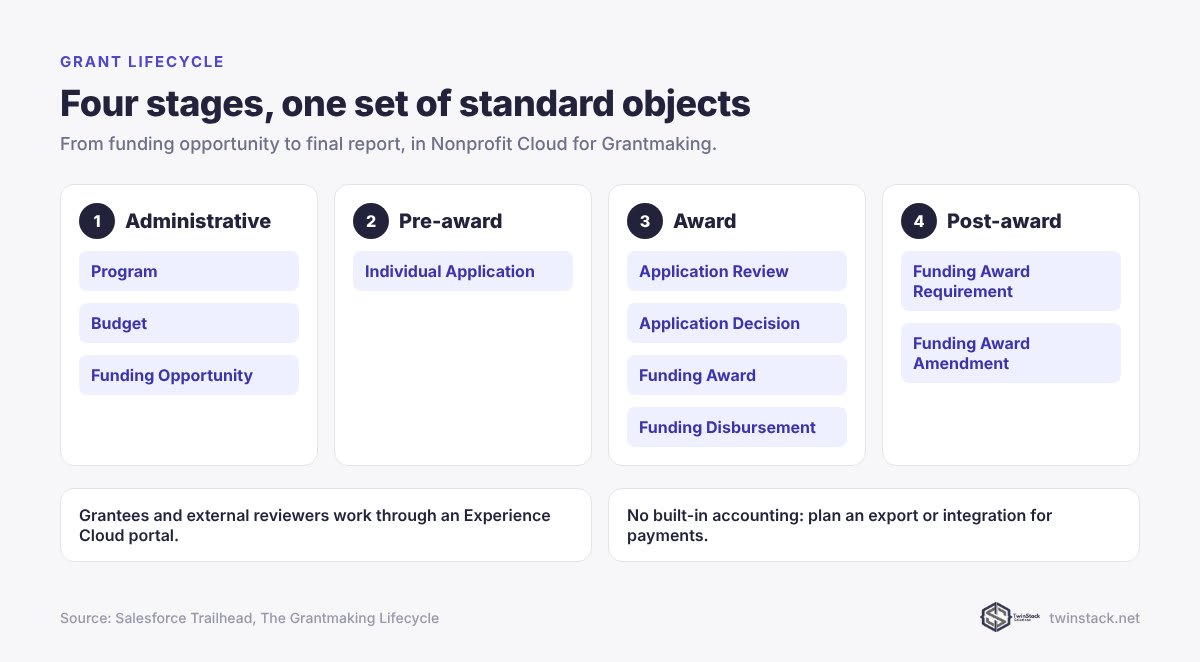
1. Administrative: budgets and opportunities
- Program organises the initiative.
- Budget tracks how much is available, in money or in kind, by category and period.
- Funding Opportunity defines a specific grant offering: description, instructions, deadlines and dates. Opportunities can be public or invitation-only.
2. Pre-award: applications
- Individual Application tracks each application from start to finish. Application forms can include budget tables and file uploads.
3. Award: review and decide
- Application Review captures reviewer feedback and scores. Scores are stored separately, so they can be rolled up and compared across reviewers.
- Application Decision records whether an application is awarded or declined.
- Funding Award tracks the grant, its amount and budget, and is the source of truth for the life of the grant.
- Funding Disbursement records each payment under the award.
4. Post-award: grantee management
- Funding Award Requirement defines what the grantee must do, such as interim reports, and can be tied to disbursements so a payment waits until a report arrives.
- Funding Award Amendment tracks changes to amount, scope or timeline.
Portals for applicants, grantees and reviewers
Applicants and grantees typically use an Experience Cloud portal to apply, track their grants, see scheduled payments, submit reports and request amendments. External reviewers can use the same portal with permissions limited to what they need. The Max edition includes 100 Customer Community Plus logins a month for applicants. If you expect more, read our Experience Cloud pricing guide.
What it does not do on its own
- Accounting. There is no built-in accounting module. Payments are usually exported or integrated with a finance system.
- Due diligence data. Checks against external registers usually need separate subscriptions or integrations.
- Downloading a full application with attachments as a single document may need custom work.
Plan these into the project rather than discovering them after go-live.
Who it suits
| Funder | Likely fit |
|---|---|
| A few grant rounds a year, simple forms, small team | A lighter grants tool or a simple Salesforce build may be enough |
| Several programmes, reviewer panels, staged payments, required reports | A strong fit |
| Already running fundraising or programmes on Nonprofit Cloud | A strong fit, because grantmaking shares the same platform |
What it costs
Nonprofit Cloud Max, which includes grantmaking, lists at $285 per user per month for nonprofits, as verified on 29 September 2026. Only staff who manage grants need full licences. Applicants and external reviewers use portal licences. The build is separate: configuring programmes, application forms, review rubrics, award automation and the portal. Price it with our cost estimator, and see our nonprofit pricing guide for the licence side.
Frequently asked questions
What is Nonprofit Cloud for Grantmaking?
It is Salesforce's grant management product for funders. It manages funding opportunities, applications, reviews, awards, disbursements and grantee requirements in standard Salesforce objects.
Is Salesforce grantmaking for nonprofits that receive grants?
No. It is designed for organisations that give grants. Nonprofits that receive grants track them on the fundraising side of Nonprofit Cloud or NPSP.
How much does Salesforce grantmaking cost?
Grantmaking is part of Nonprofit Cloud Max, listed at $285 per user per month for nonprofits as of 29 September 2026. Portal licences for applicants and implementation are additional.
What objects does Salesforce grantmaking use?
The main objects are Budget, Funding Opportunity, Individual Application, Application Review, Application Decision, Funding Award, Funding Disbursement, Funding Award Requirement and Funding Award Amendment.
Can grantees submit reports through a portal?
Yes. Grantees can use an Experience Cloud portal to track their grants and payments, submit progress reports and request amendments.
Does Salesforce grantmaking include accounting?
No. There is no built-in accounting module, so disbursements are usually integrated with or exported to a finance system.
Prices in this article are Salesforce list prices in US dollars, per user per month billed annually unless stated, as verified on 29 September 2026. Salesforce changes pricing, so confirm with Salesforce before you sign.
Running a grant programme on spreadsheets? Book a free call and we will map your cycle onto Salesforce.